Two HuMetric MCP Servers: Which Does What, and How to Connect Them
You are reading a dealer visit note and the question arrives on its own: where has this dealer's payment discipline gone over the last three months? The answer already sits in HuMetric — behind a browser, a tab, a dashboard, a filter. The distance between where you ask a question and where the answer lives is usually larger than the question itself.
MCP closes exactly that distance.
What MCP actually does
MCP is the standard way of telling an assistant — Claude, Cursor, or anything else that speaks it — "here is what you can do." Once it is connected you stop memorising commands and write plain sentences; the assistant decides which tool to call.
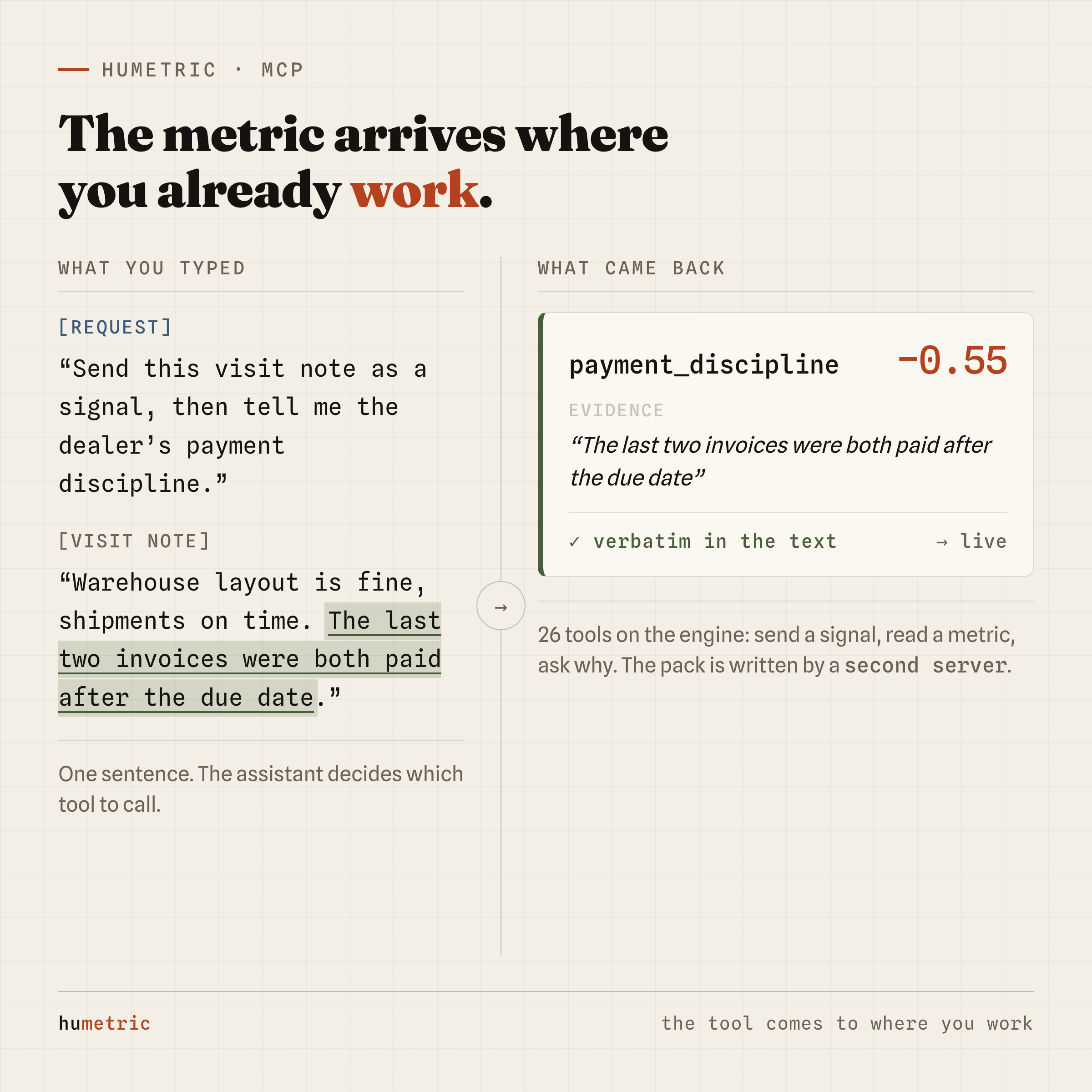
Say "send this visit note as a signal, then tell me the dealer's payment discipline" and several tools run in order behind the scenes: the note goes to the engine, processing continues in the background, and when it finishes the metric is read back. You never have to know that sequence.
Two servers, two jobs
HuMetric has two separate MCP servers, and confusing them is the most common mistake. The distinction fits in one line: the site writes, the engine runs.
| Engine MCP | Site MCP | |
|---|---|---|
| Where it runs | On your machine | gethumetric.com/mcp (remote) |
| Key | hm_live_… |
hms_live_… |
| Tools | 26 | 10 |
| What for | Working the data: send a signal, read a metric, ask why, manage packs | Producing: designing a Metric Pack in conversation, planning a signal load |
| What you pay today | Nothing, within the free usage limits | Nothing; the agents run on your own provider key |
The engine server is a thin client sitting in front of the HuMetric API: it reads and it writes. The site server exposes agents instead — the one that designs a Metric Pack from a description, and the one that turns pasted text into a signal-loading plan you can run.
They complete each other: have the pack written on the site side, then publish the resulting YAML on the engine side.
Where each key comes from
The two keys come from different places and are not interchangeable. Hand over the wrong one and the server does not recognise you.
Engine key (hm_live_…) — in the dashboard, Settings → API Keys.
Create one, give it a name. It is shown exactly once, at creation; lose it and
you mint a new one.
That is all the engine side needs. Signing up already opens your engine account, and the model is covered by the platform: without configuring a provider key of your own you can publish a pack, send signals, and read metrics and evidence. The free usage limits are 10,000 signals, 50 entities and 3 packs.
Site key (hms_live_…) — in the dashboard, the MCP server section,
MCP keys box, New key. Also shown once, with one convenience: the
moment you mint it, it drops into the "Connect a client" box right below, so
you can copy the connection command with the key already filled in.
The site server differs in one more way: its agents run on your own provider key. The Pack Wizard and Signal Agent do not run on a model HuMetric operates; they run on whichever provider you connected in the dashboard. With no key configured those two tools will not run, and the panel says so. The engine side has no such requirement.
There is no billing yet. You will see a credit balance in the dashboard; it is topped up automatically when you sign up, and each action draws from it. We have not opened payments, so when the balance runs out you just tell us and we refill it, free. That credit is not the model cost either — that lands on your own provider bill — it is a flat platform fee per action, to be charged for later, not today.
Connecting
The engine server runs on your own machine:
claude mcp add humetric --scope user \
  --env HUMETRIC_MCP_API_KEY=hm_live_yourkey \
  --env HUMETRIC_BASE_URL=https://api.gethumetric.com \
  -- uvx --from git+https://github.com/bestekarx/humetric.git humetric-mcp
--scope user makes it available in every project and keeps your key out of
any repository. Nothing to install or clone — uvx fetches and runs the server
in an isolated environment.
The site server is remote, so an address and a header are all it takes:
claude mcp add --transport http humetric-site https://gethumetric.com/mcp \
  --scope user \
  --header "Authorization: Bearer hms_live_yourkey"
With both added, run claude mcp list; each line should read ✔ Connected.
New servers only appear in a new session — an open one keeps the list it
started with.
Configuration blocks for Claude Desktop, Cursor and VS Code are on the
MCP section of the docs, along with the single most common failure:
desktop apps start servers without your shell's PATH, so plain uvx may not
resolve. Writing the absolute path from which uvx fixes it.
What you can do with it
Once connected, the work turns into sentences:
Which metric packs exist?
Show me the metrics for dealer D-1042.
Why is payment_discipline at -0.55? Which notes drove it?
Rank the dealers by payment discipline.
Send this visit note to D-1042 as a signal: <text>
How much have I used this month?
One mechanical detail is worth knowing: a metric is not ready the moment you send a signal. The note is queued, processing continues in the background, and it finishes seconds later. The server tells the assistant as much — confirm the work is done before reading the metrics. Ask for "send it, then show me the metrics" and that wait happens on its own.
A typical end-to-end run uses both servers:
- Site MCP — "I want a pack for hotel reviews." The wizard asks, you answer, and you end up with a valid pack YAML.
- Engine MCP — "Publish this pack."
- Engine MCP — "Send these 20 reviews as signals."
- Engine MCP — "Who is the most reliable reviewer?"
- Engine MCP — "Why them? Show the evidence."
That last step is the point of the whole thing. HuMetric hands you the number together with the sentence it rests on. "−0.55" on its own is not something you can argue with; paired with "the last two invoices were both paid after the due date", there is nothing left to argue about.
Three things not to mix up
The two keys differ. hm_live_ is the engine's, hms_live_ the site's.
Swap them and the server will not recognise you.
Tool names look alike, servers do not. Both sets start with humetric_,
but the client separates them by server name, so nothing collides.
Sensitive metrics are not produced without consent. A metric marked sensitive in the pack simply does not exist for an entity without explicit consent — not a struck-through value, not a hidden record: it is never written. The raw signal text you send is stored, but the sensitive metric is not produced. And the assistant will not grant consent on your behalf: consent is the data subject's declaration, not the assistant's assumption.
Why it is worth the five minutes
A dashboard is a good place to look at data. But one question usually breeds another — why did it drop, which note, does it show up in other dealers — and going back to the browser for each one breaks the thought.
With MCP the whole chain, from definition to evidence, stays where you are typing: you have the pack written with a sentence, send the signal from there, read the number there, and ask "why" there too. What changes is not what HuMetric does; it is the price of reaching it.
# summary: two commands
claude mcp add humetric --scope user \
  --env HUMETRIC_MCP_API_KEY=hm_live_yourkey \
  --env HUMETRIC_BASE_URL=https://api.gethumetric.com \
  -- uvx --from git+https://github.com/bestekarx/humetric.git humetric-mcp

claude mcp add --transport http humetric-site https://gethumetric.com/mcp \
  --scope user \
  --header "Authorization: Bearer hms_live_yourkey"

claude mcp list   # both should read ✔ Connected